How to check loans between associated entities agree
Last updated 4 November 2026
A loan to a related entity should match that entity's own ledger. How to check associated entity loans in one click with Report Craft, and see what's out and by how much.
A family group lends money to itself all year. The company owes the trust, the trust owes the director, and each entity's books say what they say. At year end, the loan in one ledger should be the exact opposite of the loan in the other, and finding out it isn't, in the middle of signing off, is nobody's idea of a good afternoon. Check associated does the comparison for you, across your client ledgers.
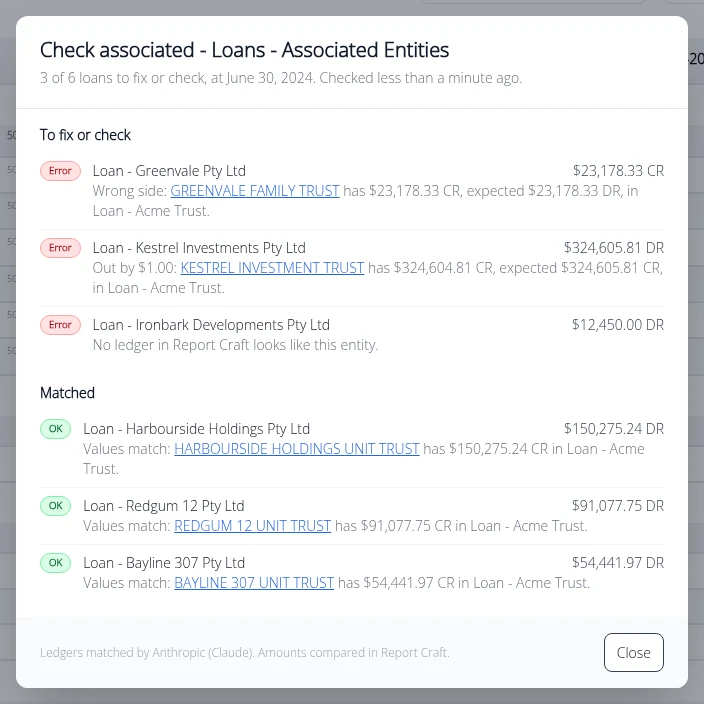
Running the check
- Open the Balance Sheet or Sub Accounts for a ledger.
- Click Check associated beside the loans account.
- Read the results. A pill at the top reads All OK or the number of errors, then each sub-account is listed under To fix or check or Matched.
- Click a ledger's name to open that ledger's Balance Sheet at the account, on the same period, and look into it.
Results stay available from the Results button, so you can come back to them while you work through the list.
What it tells you
- Values match - the other ledger shows the exact opposite amount.
- Out by - and by how much, so you know what you are looking for.
- Wrong side - a debit where a credit should be.
- Nothing in - the other ledger has no matching balance.
- No matching ledger - no client ledger of yours matches this sub-account's name.
What you need
The check appears on accounts named for associated entities, related parties or inter-company loans. It uses your firm's own AI key, already set for AI Analysis, to match each sub-account's name to a client ledger. Only names are sent, not amounts, and nothing is written to any ledger.
Use it with judgement
Check associated compares balances: it finds what doesn't agree, quickly. A match is a good sign rather than a reconciliation, so you still sign off on the loan as you always have. What it removes is the hours of opening ledger after ledger to find which of them needs your attention.
Before you consolidate
If those entities are consolidated, this is the right first step. An intercompany loan has to agree before it can be cleanly eliminated, so run the check, fix what's out, and then post your eliminations.
Watch the Check associated how-to video.
Try it on your own clients
Connect a QuickBooks, Xero or MYOB ledger, or import a spreadsheet, and have a full report pack in minutes. Free for 14 days.
Related guides
How to standardise client charts of accounts with a template
Keep your firm's model chart of accounts and see exactly what to rename, recode, move or add in any client's ledger.
How to post a journal from the report you are reading
Post a journal from the report you are reading on a QuickBooks or MYOB ledger, watch the figures move, and take it back if you change your mind.
How to consolidate financial statements across QuickBooks and Xero
Combine client ledgers from both accounting packages into one group and produce a single set of consolidated financial statements.
Intercompany eliminations in consolidated accounts, explained
Why intercompany balances have to be removed on consolidation - and how to post the elimination journals that do it.
Consolidating a trust group: a practical guide for accountants
Trust groups add distributions and appropriations to the mix - here's how to consolidate them cleanly.