How to agree a plan with a client and follow it through
Last updated 4 November 2026
Advice only pays off if it gets done. How accounting firms can set out agreed steps, keep meeting notes against them, and let clients tick them off in their Report Craft portal.
Most advisory meetings end with an agreed list of things to do, and most of those lists end up in somebody's notes. Client Plans keeps the list somewhere both of you can see it, next to the client's figures, so the next meeting starts from what got done rather than from what anyone remembers.
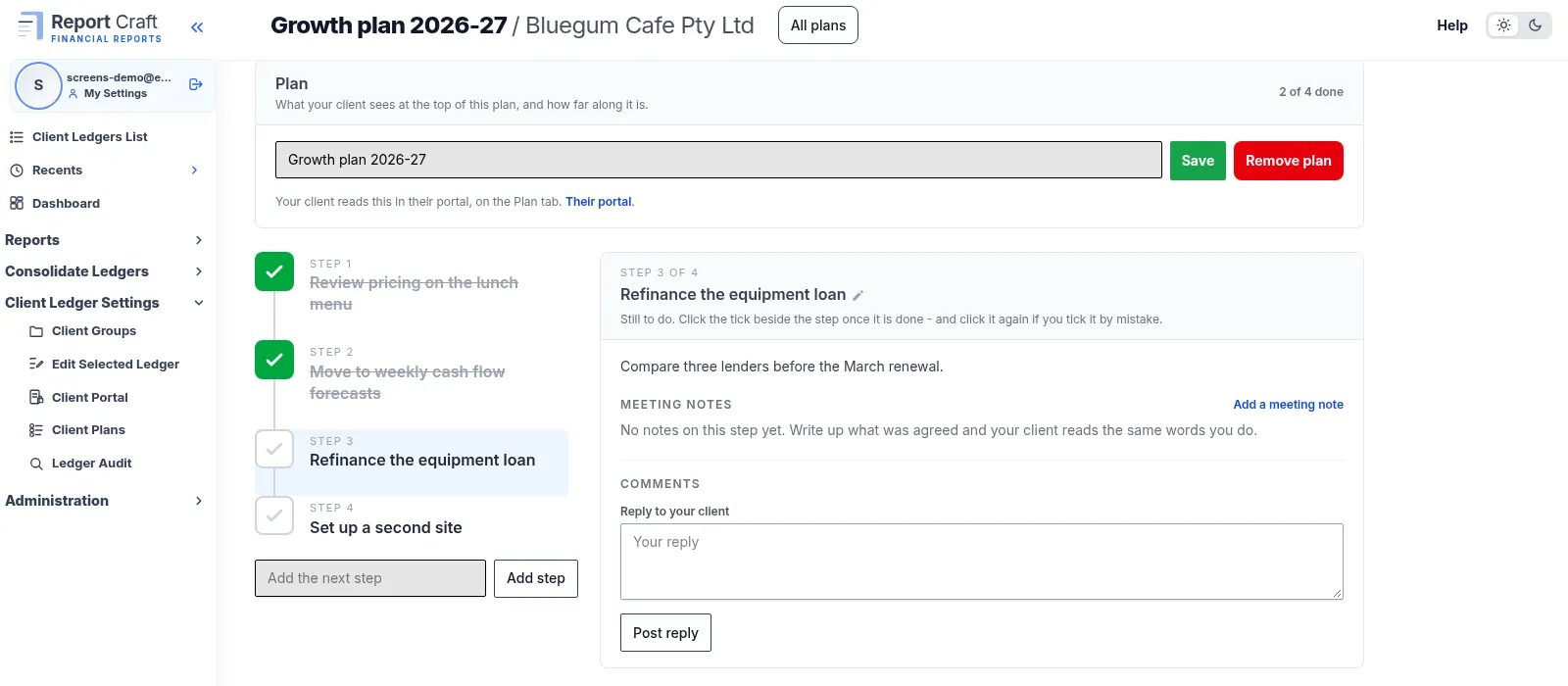
Writing the plan
- Open the ledger and go to Client Ledger Settings, then Client Plans.
- Click Add Plan and give it a title. A client can have as many plans as you need.
- Click Add step for each thing you agreed.
- Add a meeting note against a step to record what was discussed and when.
- Drag steps into the order they should happen.
How your client follows it
Once a plan has a step and the client's portal is open, it appears on the portal's Plan tab. Your client reads the plan where they read their accounts, ticks off a step when it is done, and can leave a comment on it. You read the comment on the same step and post a reply.
Only your firm can write, reorder or remove steps. Your client can tick and comment, nothing more, so the plan always stays the one you agreed.
Why keep it beside the numbers
A plan to lift margins means more when the margin chart is one tab away. Pair a plan with the client's Dashboard and a Custom Ratio, and each review can show whether the agreed steps moved the figure they were meant to move.
Plans live in the Client Portal, so set that up first. There is also a how-to video for client plans.
Try it on your own clients
Connect a QuickBooks, Xero or MYOB ledger, or import a spreadsheet, and have a full report pack in minutes. Free for 14 days.
Related guides
How to give clients a secure portal for their financial statements
Give each client a read-only window onto their finalised years, on screen or as a PDF, behind a link and a password they choose.
How to plan client visits with a map of your client base
See every client pinned by address, pick the ones to visit and get a sensibly ordered route, ready for Google Maps.
How to consolidate financial statements across QuickBooks and Xero
Combine client ledgers from both accounting packages into one group and produce a single set of consolidated financial statements.
Intercompany eliminations in consolidated accounts, explained
Why intercompany balances have to be removed on consolidation - and how to post the elimination journals that do it.
Consolidating a trust group: a practical guide for accountants
Trust groups add distributions and appropriations to the mix - here's how to consolidate them cleanly.