How to track custom financial ratios for a client
Last updated 4 November 2026
Measure wages against sales, or any accounts against any others. How to build a Custom Ratio in Report Craft, draw it as a pie chart and put it on a Dashboard or in a report pack.
Standard ratios answer standard questions. The question a client actually asks is usually narrower: how much of our sales goes on wages? What share of costs is the fleet? How much does the café really contribute? A Custom Ratio answers it with the client's own accounts, and it stays up to date as the ledger does.
Building a ratio
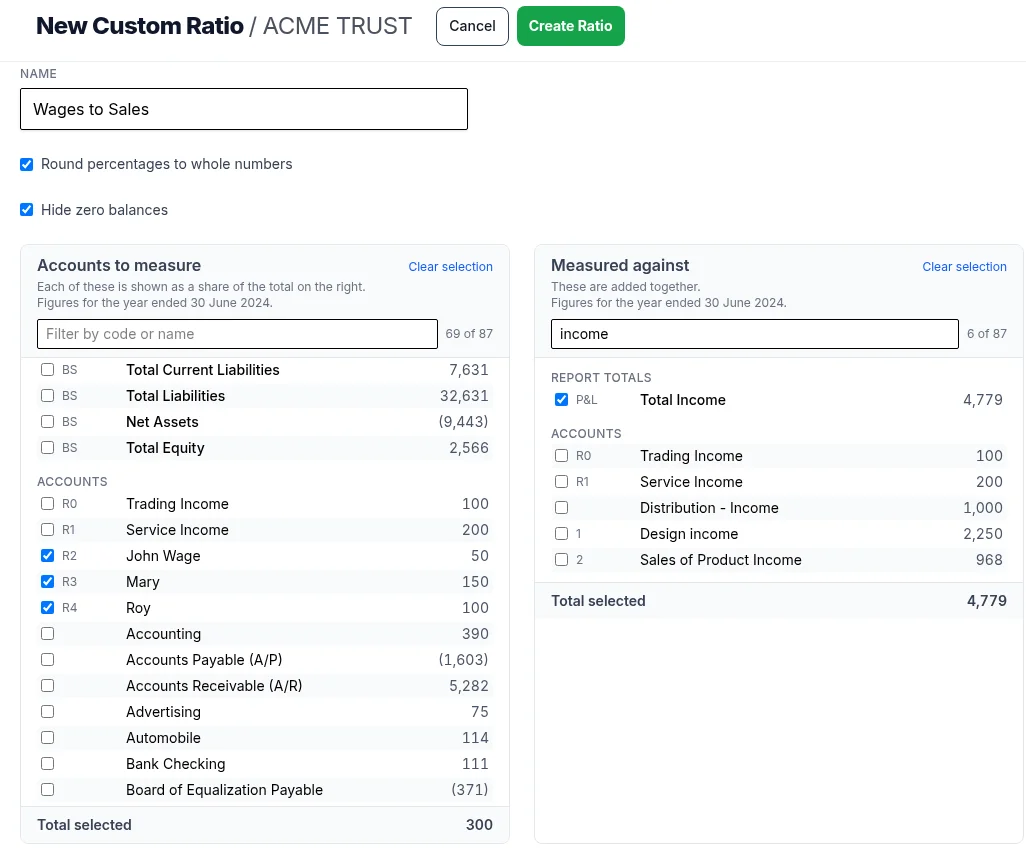
- Open the ledger and go to Client Ledger Settings, then Custom Ratios.
- Click New Custom Ratio and name it, such as Wages to Sales.
- Under Accounts to measure, tick what you are measuring.
- Under Measured against, tick what you are measuring it against.
- Click Create Ratio. Press F11 to save and Alt+E to edit it later.
Either side can mix individual accounts with report totals from the Profit & Loss and Balance Sheet, such as Total Income or Net Assets. Each list filters as you type, shows the figures beside the accounts and can hide zero balances, with a running total underneath and Clear selection to start again.
Reading it
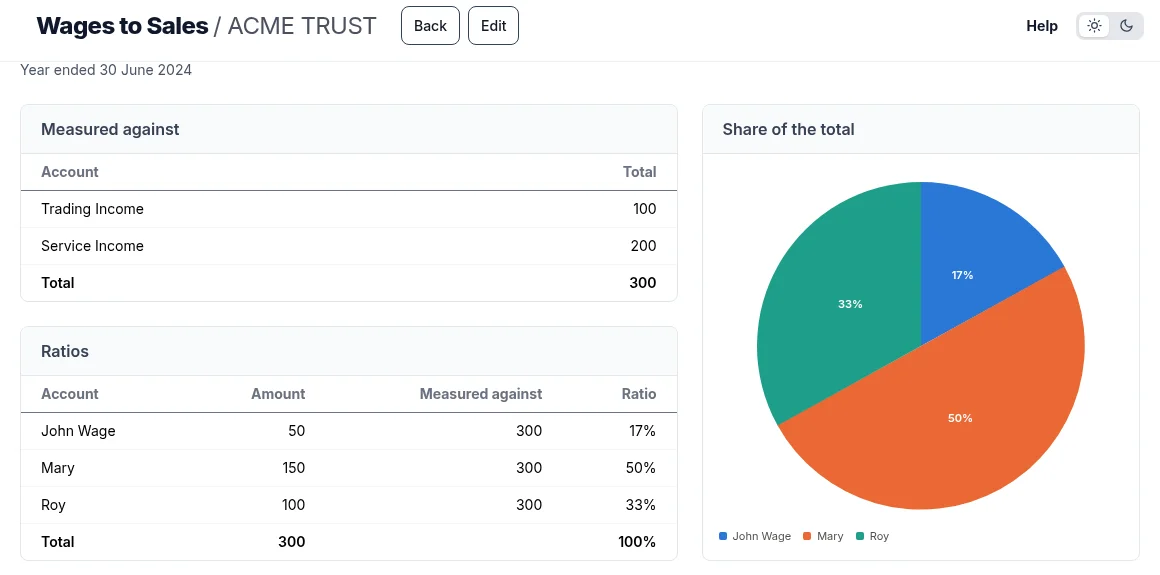
Each item you measured is shown as a share of the total you measured it against, with a Total row adding up the amounts and ratios and a pie chart beside them. Anything not selected shows as an Everything else slice, so the whole base is always in view. Percentages round to whole numbers, or untick that to see two decimal places. A ratio reads the ledger's latest financial year.
Putting it to work
- On the Dashboard. Add Widget lists your Custom Ratios, so a ratio can open with the ledger.
- In a report pack. Add it to a custom page and it prints in the PDF beside your commentary.
- In a client plan. If the plan is to bring wages down, the ratio is how you both see it working.
Ratios worth building first
- Wages against total income
- Rent against total income
- Motor vehicle costs against total expenses
- Each income stream against total income, to see which pays the bills
See it in the Custom Ratios how-to video.
Try it on your own clients
Connect a QuickBooks, Xero or MYOB ledger, or import a spreadsheet, and have a full report pack in minutes. Free for 14 days.
Related guides
How to add your own pages to a client report pack
Add your own pages to a pack - charts, text boxes and pictures, dragged where you want them - and stamp it Draft or Confidential.
How to create financial statements from a spreadsheet of balances
No accounting package? Create a ledger from up to five years of balances, using our downloadable template, and every report is ready.
A financial dashboard for every client ledger
Every ledger opens on its headline figures against last year, with charts you add, change and drag into place.
How to run financial reports for a month, quarter or any period
Run reports for a month, a quarter, a half year or any range, compared with the period before and saved for next time.
Professional financial reports from MYOB, for accounting firms
Connect MYOB company files alongside QuickBooks and Xero, with figures that match MYOB to the cent and refresh overnight.