How to create financial statements from a spreadsheet of balances
Last updated 4 November 2026
Client not on QuickBooks, Xero or MYOB? Import up to five years of balances from a spreadsheet and produce a full set of financial statements in Report Craft.
Not every client keeps their books in a cloud package. Some have an old desktop system or a workbook, and some have just changed accountants with little more than last year's trial balance. They still need the same statements as everyone else. Import Spreadsheet turns a list of balances into a full Report Craft ledger, so those clients get the same pack, with the same house style, as your connected ones.
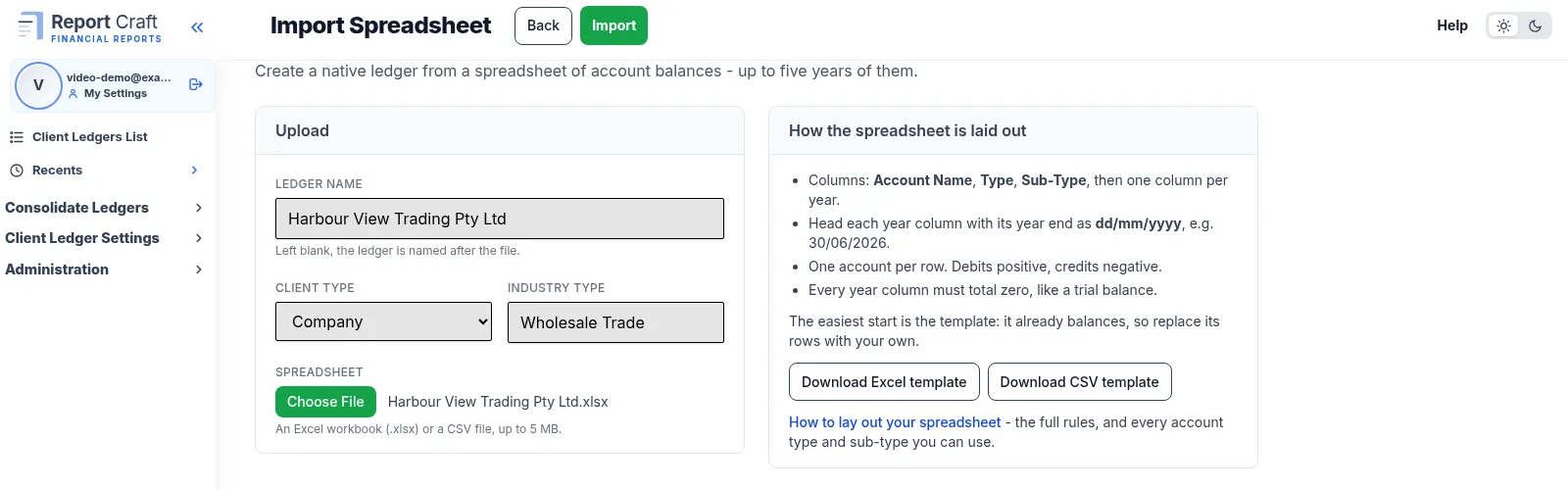
Importing step by step
- On Client Ledgers, click Connect Ledger, then Import Spreadsheet.
- Download the template as Excel or CSV. A help page explains how to lay out your own.
- Fill in the balances: an Account Name and Type for each account, plus a column for each year, up to five.
- Choose the file, give the ledger a name, a Client Type and an Industry Type, and click Import.
- You land on the Chart of Accounts with every report ready to run.
How to lay out the file
- An .xlsx (first sheet only) or .csv file, of up to 5 MB and 2,000 rows.
- Year headings as dates in dd/mm/yyyy form, each one a 30 June.
- Debits positive, credits negative, and each year must total zero.
- Account names must be unique. Sub-Type is optional.
If anything is wrong, nothing is imported and you are told what to fix, so you never end up with half a ledger.
What you get
The ledger behaves like any other for reporting: Profit & Loss, Balance Sheet, Trial Balance, your report packs, your branding, comparatives across the years you imported. It lives in Report Craft and is billed as one client ledger. Because there is no package behind it, there is nothing to refresh: bring in new figures by entering them in Report Craft. It can also join a consolidated group alongside connected ledgers.
Watch the Import Spreadsheet video.
Try it on your own clients
Connect a QuickBooks, Xero or MYOB ledger, or import a spreadsheet, and have a full report pack in minutes. Free for 14 days.
Related guides
How to add your own pages to a client report pack
Add your own pages to a pack - charts, text boxes and pictures, dragged where you want them - and stamp it Draft or Confidential.
How to track custom financial ratios for a client
Measure wages against sales, or anything against anything, and draw it as a pie chart on the Dashboard or in a report pack.
A financial dashboard for every client ledger
Every ledger opens on its headline figures against last year, with charts you add, change and drag into place.
How to run financial reports for a month, quarter or any period
Run reports for a month, a quarter, a half year or any range, compared with the period before and saved for next time.
Professional financial reports from MYOB, for accounting firms
Connect MYOB company files alongside QuickBooks and Xero, with figures that match MYOB to the cent and refresh overnight.